All features

Quotes + e-signature

Send the quote. Get it signed from a phone.

Build an itemized quote from your own price book, offer the upgrades you actually want to sell, and let the homeowner approve it from the link — no printer, no PDF, no third follow-up call.

  • You read their copy before it sends
  • Signed from a phone, no account
  • No per-quote fee

The draft is priced from the services you set up. Anything priced outside your book is flagged before it goes out, and the approval is recorded with the name and the moment.

ExampleA quote as the homeowner sees it, with one upgrade taken.

Quote #1042 · Whitfield

Approved
Tear-off and haul away
$1,850
Architectural shingles · 24 sq
$6,240
Ridge vent and flashing
$1,310
Upgrade taken · 50-year shingle
+$1,480
Total
$10,880

Signed “Dana Whitfield” · Tue, May 13 at 6:41 PM. The first signature and its timestamp are the ones that stick, and the upgrade is stored as a snapshot — editing the option later never rewrites what somebody agreed to.

Collect depositPut on the calendar

Invented job, invented prices. What is real is the shape: line items from your price book, an upgrade priced as a difference, and a typed signature with its timestamp.

Priced from your bookYour services, your units, your rates.Signed by typing a nameTimestamped and locked to the record.Upgrades, not hagglingThe customer picks; the difference is shown.Follow-ups that stopTwo reminders, then it leaves them alone.

The quote is the start of the job, not a document

A signed PDF is where most quoting tools hand the job back to you.

An approved quote here already knows the customer, the property, the scope and the photos, because the request it was built from did. So approval is not a file you save and retype somewhere else — it is the same record moving to its next stage, with a deposit to collect and a date to put on the calendar.

Stop pricing from memory

The draft is built from the request and priced from the services you set up, with units that suit the work — per job, per hour, per square foot, per visit. A line priced outside your book is marked so you look at it before the customer does.

Sell the upgrade without the sales call

Offer colors, materials and fixtures with what the quote already allows for and what an upgrade adds. The choice is recorded with the name, the moment and a snapshot of the option as it was.

Get the yes in writing, from a phone

The homeowner opens one link, reads the scope, takes or leaves the upgrades and types their full legal name. No account, no password, no app to install.

INTERACTIVE QUOTE & UPSELL ENGINE

Send quotes that sell upgrades for you.

Give homeowners good/better/best package options, optional add-ons, and payment plans they can approve from their phone in seconds.

B
Brightline Bath & Tile
Quote #1048 · 60" Walk-In Shower Conversion
READY TO APPROVE

Step 1: Choose Your Package

Step 2: Optional Upgrades & Add-ons

+ Click to toggle
Total Investment$8,050
$4,025 deposit today, followed by 4 monthly installments of $1,006/mo.

Why Interactive Quotes Win More Work

📈 +24% Higher Ticket Size⚡ 3x Faster Approvals

Static PDF quotes force contractors to guess what the homeowner wants. With Let’s Get Quoted, customers can customize their tier, add luxury upgrades, and pick payment terms without another phone call.

  • Multi-Tier Good/Better/Best: Present options naturally without leaving money on the table.
  • Self-Serve Upgrades: Homeowners frequently tick warranty & finish upgrades on their phone.
  • 0% In-House Installments: Offer structured monthly payments without third-party lender fees.
  • Legally Binding E-Signatures: Locks scope, price, and terms with automatic IP & timestamp audit logs.
Explore comprehensive quoting software

The quote builder, as it ships

This is the screen, not a drawing of it.

A demo account belonging to an invented landscaping business, captured as it is today. The numbers are made up; everything around them is the product.

  1. Step 1

    List what is included, then what is optional

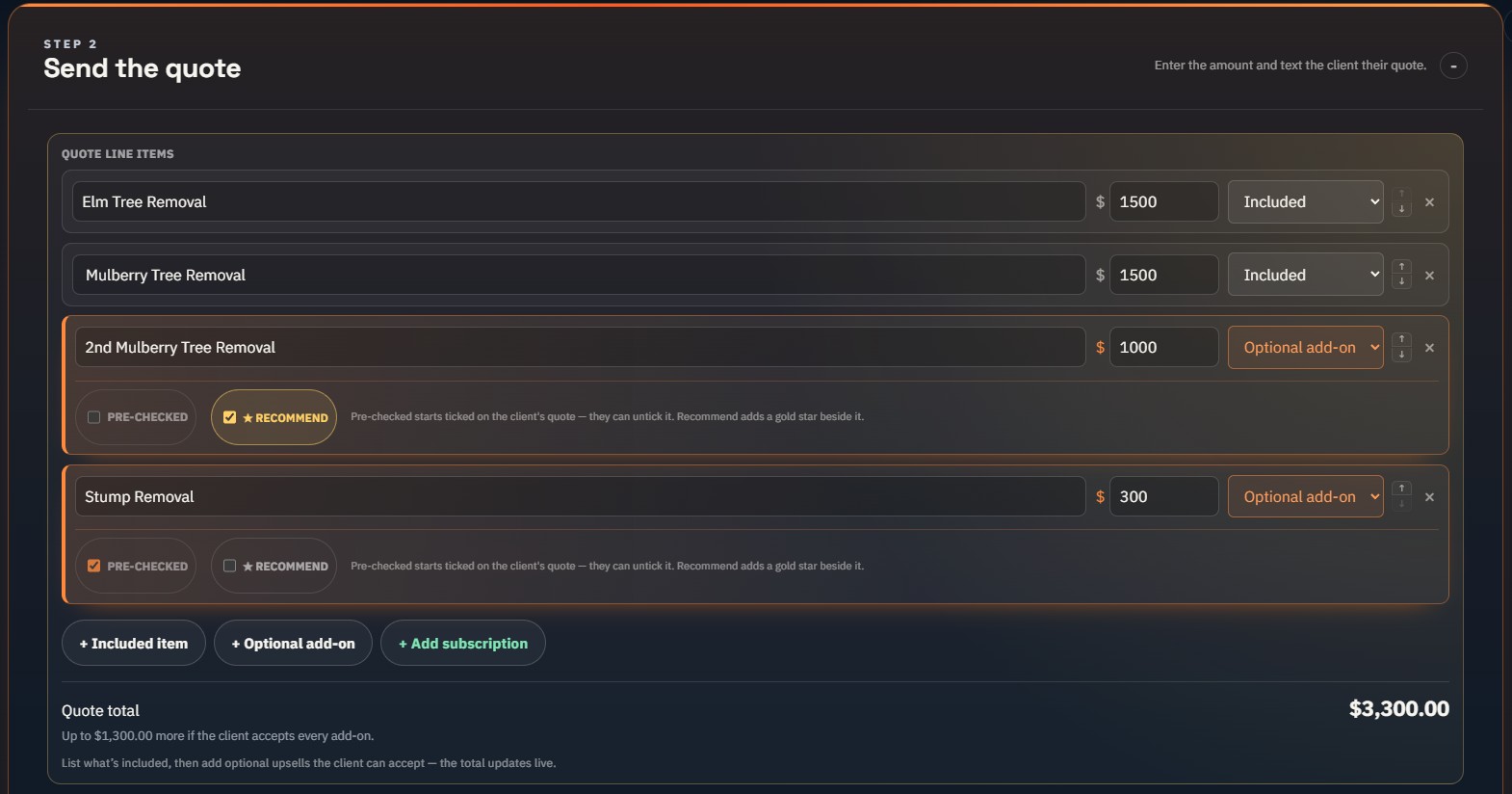
    Included lines make the price. Optional add-ons sit under them, each one either pre-ticked on the homeowner’s copy or starred as a recommendation — and the total updates live as they take them.

    The quote builder with four line items — two included, two optional add-ons marked pre-checked and recommended — and a $3,300 total.
  2. Step 2

    See their copy before you send it

    Preview opens the homeowner’s own approval screen — the included work, the add-ons they can take, and the total moving as they do. Nothing has been sent at this point.

  3. Step 3

    Choose how they pay, and whether we text them

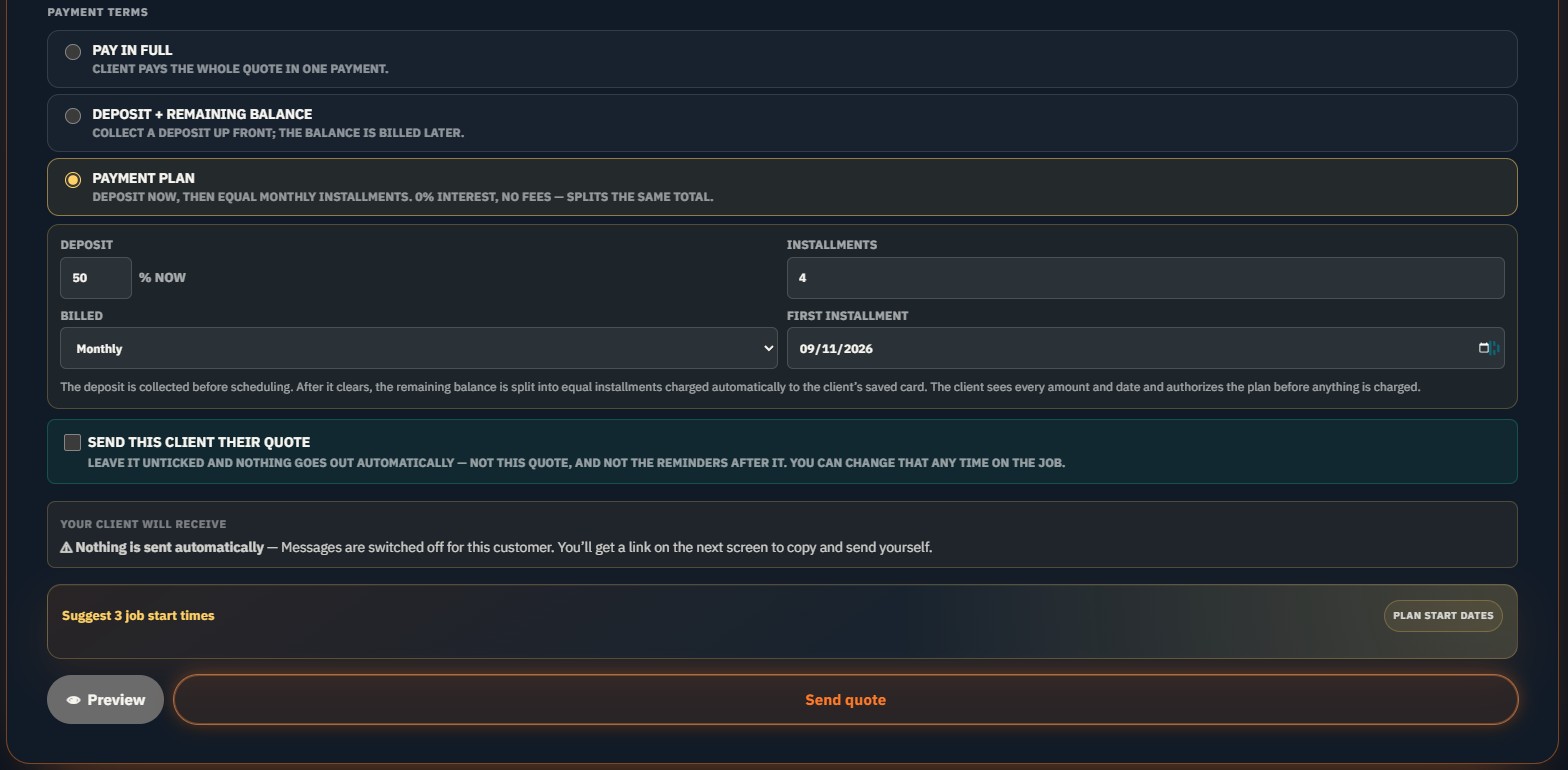
    Pay in full, a deposit with the balance later, or a 0%-interest plan — a deposit now and equal monthly installments on their saved card. The send toggle is yours: leave it off and nothing goes out automatically, and you get a link to send yourself.

    Payment terms on the quote: pay in full, deposit plus balance, or a payment plan with a 50% deposit and four monthly installments, above Preview and Send quote buttons.
  4. Step 4

    They authorize the exact schedule

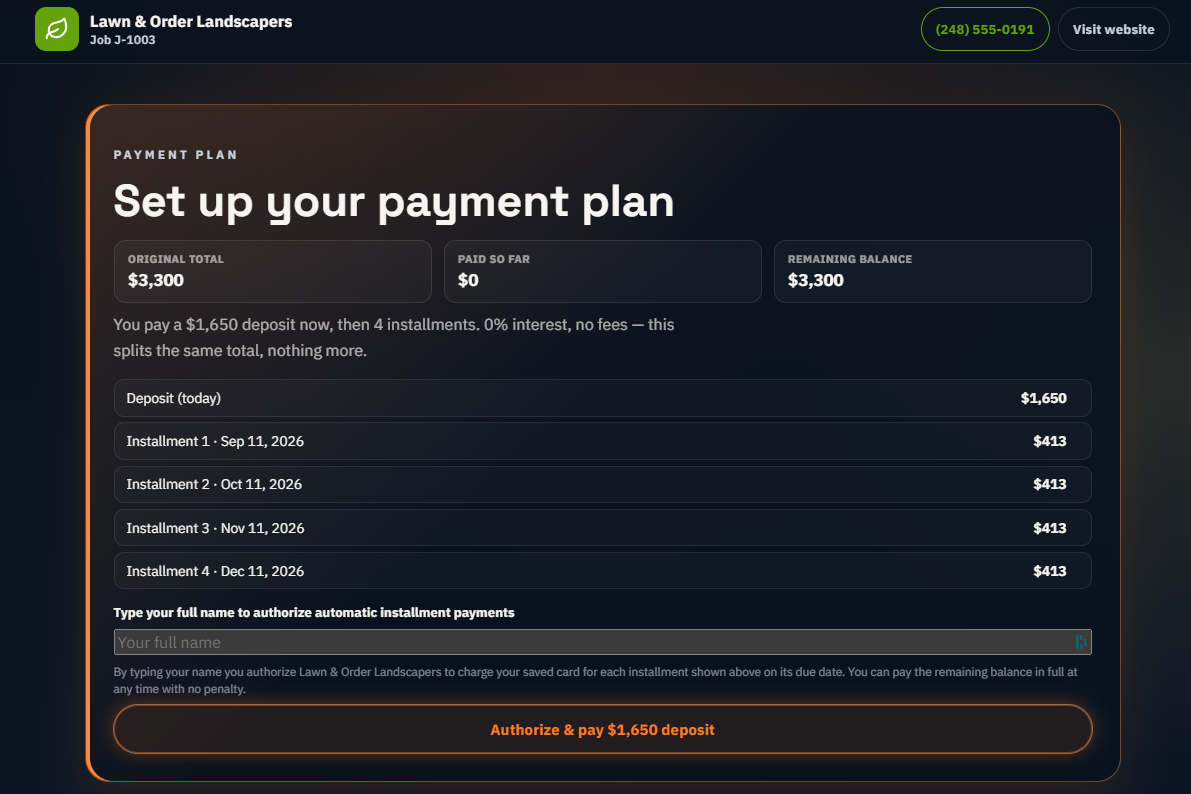
    The homeowner sees every amount and every date before anything is charged, and types their name to authorize the installments. They can pay the balance off early with no penalty.

    The homeowner’s payment-plan screen: a $1,650 deposit today and four $413 installments dated monthly, with a name field to authorize them.

Every amount above is invented. What is real is the shape: included work and optional add-ons on one total, a preview of the homeowner’s copy before anything sends, and a plan they authorize date by date.

What the quote carries

Everything attached to an approved quote.

Not modules you switch on one at a time. These are parts of the same record, and each one is there because the stage before it already collected what it needs.

Quotes & e-signatures

Send a branded quote and get it signed from a phone — no printer, no PDF.

  • Itemized quotesLine items, optional add-on upsells, and subscription options.
  • Client e-signatureHomeowner signs by typing their name; timestamped and locked to the record.
  • Deposit gateRequire a paid deposit before scheduling or before work starts.
  • Automatic follow-upsRemind clients about un-approved quotes up to twice, then stop — hands-off.
  • Client job portalOne link to review, approve, sign, schedule, and pay.

5 of the 87 things the platform does. See all of them.

Instant Printable Estimates & PDF Reports

Export clean, professional 1-page PDF estimates.

Need a clean physical estimate or a printable PDF for insurance and commercial property managers? Generate deterministic 1-page estimates and visual inspection check-sheets with your logo and license numbers in one click.

Try the Free 1-Page Estimate Generator Tool →

Before you start

The practical questions.

Is a typed name really a signature?

It is an electronic signature, and it is recorded the way one has to be: the full legal name the homeowner typed, the moment they typed it, and a lock on the record afterwards. The first signature and its timestamp are the ones that stick — a later edit cannot quietly become the thing that was agreed to.

What happens if the job turns out to be bigger?

A change order. The crew photographs what they found, the extra work is priced, and the homeowner agrees to it in writing on the same record — instead of on a phone call two people remember differently.

Do quotes expire?

Not on their own — an old link still opens, and there is no date after which a customer finds a dead page. What stops is the chasing: the quote follows up twice by default, up to three times if you set it that way, and then goes quiet. If a price is no longer good, revise the quote; the customer is told the total changed rather than discovering it.

How is sales tax handled?

The quote is the price you set — line by line, as the customer sees it. Tax is applied on the invoice, where the rate and the discount live, so it is calculated once against the amount actually being billed rather than being carried through every draft and revision.

What is kept once a quote is approved?

The name they typed, the moment they typed it, the line items and the upgrades they took or left. Edit an approved quote afterwards and the product makes you say so deliberately, then puts a note on the customer’s own page naming the old total and the new one — a changed quote can never be a silent one. What it does not yet do is keep a full copy of the earlier document, so for extra work on an agreed price a change order is the cleaner route: it prices the difference and gets that agreed on its own.

Can I require a deposit before I schedule?

Yes. The deposit gate can hold scheduling, or hold the start of work, until a deposit is actually paid. It is a setting rather than a habit you have to keep.

Do I have to build a price book first?

No. You can quote by hand from day one and add services as you go. The book only changes how fast the draft arrives — anything priced outside it still goes out, it is just marked for you first.

What does it cost to send a quote?

Included on every base plan. Flex starts at $0/month plus a 1.25% LGQ platform fee. Solo, Growth, and Scale add a base subscription and lower that fee to 0.50%, 0.25%, or 0.10%. Core quotes are unlimited and have no per-quote charge. The LGQ platform fee applies only if you collect an eligible payment through LGQ; Stripe's processing and payment-infrastructure costs set by Stripe are separate.

THE FULL CONTRACTOR SUITE IS READY

Quote it once. Let them sign it tonight.

Create your site, qualify better leads and run every job from one place.

Create Free Account No card required · Flex starts at $0/month + 1.25%
Create Free Account
Quotes and E-Signatures for Contractors · Let's Get Quoted